
What You Actually Do
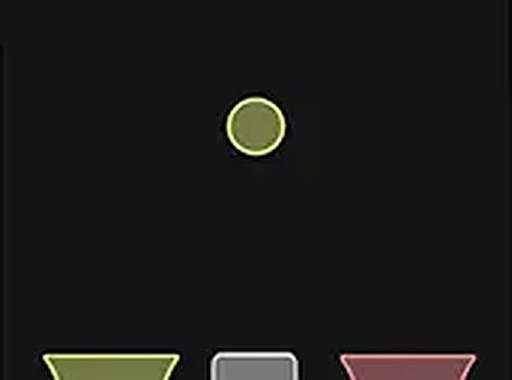
Colored shapes appear on screen one after another. A target color is displayed, and your only job is to tap or click the right side of the screen when the incoming shape matches that color. That single decision—match or don't match—is the whole game. There is no menu navigation, no button combinations, and no inventory to manage. The challenge comes from how quickly you can process the visual cue and commit to a tap.
Why the Difficulty Curve Matters
The game starts at a manageable pace and gradually increases speed as you progress. This progressive difficulty is the main source of replay value. Early on, you have time to think about each shape. Later, the window for a correct tap narrows, and your reaction time becomes the limiting factor. The game ends the moment you tap incorrectly or miss a valid match, so every session is a single run rather than a series of forgiving levels. That structure makes high scores feel earned.
Controls and Device Support
On a desktop computer, you use the mouse to tap the right side of the screen. On a smartphone or tablet, you use your finger. The game runs directly in a web browser, so there is no download or installation step. It works on any device with an internet connection. A full screen mode is available if you want a larger, less cluttered view, which can help on smaller screens where peripheral shapes are easy to miss.
Who This Suits
Because the rules are explained in seconds and the controls are one tap, the game is accessible to young children and adults alike. The visuals use clear, vibrant colors, which reduces the chance of mistaking one shape for another. If you enjoy short, repeatable reflex challenges rather than long story-driven sessions, this fits that pattern. If you prefer games with complex systems or narrative, the single-mechanic loop may feel thin.







Editorial Notes